Meet Notifications
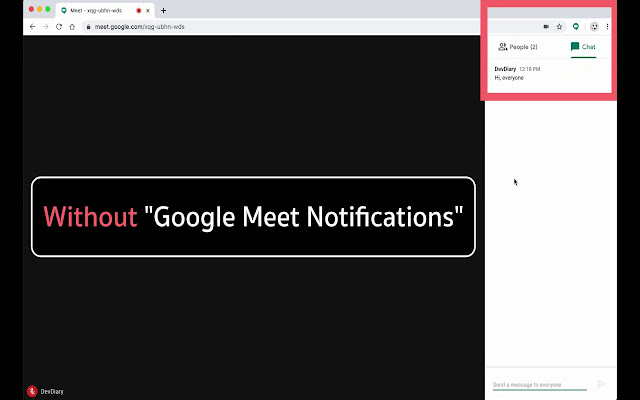
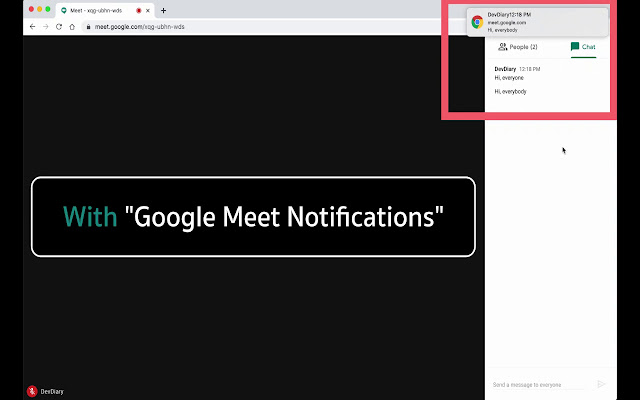
Meet Notifications improves the Google Meet experience with "Notification" when the audience sent the message in the room.
什麼是Meet Notifications?
Meet Notifications是由DevDiary開發的Chrome擴展程式,該擴展的主要功能是“Meet Notifications improves the Google Meet experience with "Notification" when the audience sent the message in the room.”。
擴展截圖

下載Meet Notifications擴展crx文件
下載Meet Notifications擴展crx格式的文件,手動將Chrome擴充功能安裝到瀏覽器中,也可以將crx文件分享給朋友,輕鬆安裝Chrome擴充功能。
擴展使用說明
                        --- วิธีใช้งาน ---
1. คลิกที่ icon "Meet Notifications"
2. คลิกที่ switch button ให้ปุ่มเปลี่ยนสถานะเป็นสีฟ้า
เพียงเท่านี้ก็สามารถใช้งาน Meet Notifications ได้แล้ว 👍

--- How to use ---
1. Click on the icon "Meet Notifications".
2. Click the switch button to change the status to blue.
That's it. You can use the Meet Notifications. 👍
擴展基本資訊
| 名稱 |  Meet Notifications Meet Notifications |
| ID | lekaeknoegncijhnchifjdnclipppcnp |
| 官方網址 | https://chrome.google.com/webstore/detail/meet-notifications/lekaeknoegncijhnchifjdnclipppcnp |
| 簡介 | Meet Notifications improves the Google Meet experience with "Notification" when the audience sent the message in the room. |
| 檔案大小 | 19.48 KB |
| 安裝次數 | 34 |
| 目前版本 | 0.1.5 |
| 更新時間 | 2020-06-24 |
| 上架時間 | 2020-06-24 |
| 評分 | 4.00/5 共 2 次評分 |
| 開發者 | DevDiary |
| 電子郵箱 | [email protected] |
| 付費類型 | free |
| 擴展官網 | https://www.facebook.com/devdiaryTH |
| 說明頁面URL | https://www.facebook.com/devdiaryTH |
| 隱私政策頁面URL | https://devdiaryth.github.io/Meet-Notifications-Privacy-Policy/index.html |
| 支援的語言 | en |
| manifest.json | |
{
    "update_url": "https:\/\/clients2.google.com\/service\/update2\/crx",
    "name": "Meet Notifications",
    "version": "0.1.5",
    "manifest_version": 2,
    "description": "Meet Notifications improves the Google Meet experience with \"Notification\" when the audience sent the message in the room.",
    "author": "Ic3berg",
    "content_security_policy": "default-src 'self'",
    "icons": {
        "16": "assets\/icon16.png",
        "48": "assets\/icon48.png",
        "128": "assets\/icon128.png"
    },
    "permissions": [
        "storage"
    ],
    "options_page": "options.html",
    "background": {
        "scripts": [
            "background.js"
        ],
        "persistent": false
    },
    "browser_action": {
        "default_icon": {
            "16": "assets\/icon16.png",
            "48": "assets\/icon48.png",
            "128": "assets\/icon128.png"
        },
        "default_popup": "popup.html",
        "default_title": "Meet Notifications"
    },
    "content_scripts": [
        {
            "matches": [
                "https:\/\/meet.google.com\/*"
            ],
            "js": [
                "content.js",
                "controller.js"
            ],
            "run_at": "document_idle"
        }
    ],
    "web_accessible_resources": [
        "content.js",
        "controller.js"
    ]
} | |