MUSE login
Automatically log in to shef.ac.uk without typing your details!
什麼是MUSE login?
MUSE login是由georgepowell10開發的Chrome擴展程式,該擴展的主要功能是“Automatically log in to shef.ac.uk without typing your details!”。
擴展截圖
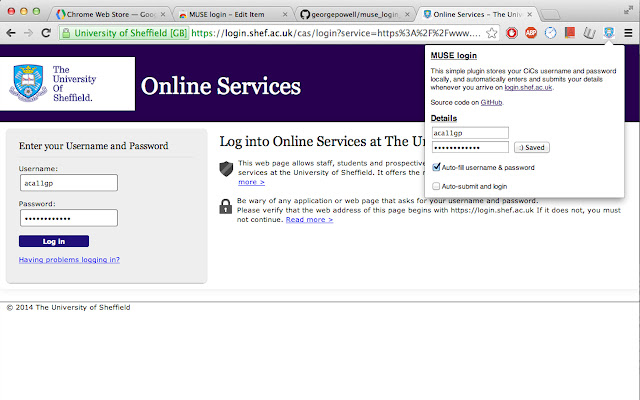
下載MUSE login擴展crx文件
下載MUSE login擴展crx格式的文件,手動將Chrome擴充功能安裝到瀏覽器中,也可以將crx文件分享給朋友,輕鬆安裝Chrome擴充功能。
擴展使用說明
                        Fed up of typing your MUSE login every single freaking time? Why can't chrome remember your password or keep you signed in like every other website? Now it can! Introducing the MUSE login chrome extension. The extension automatically fills in and submits the login form whenever you arrive on the university login page, so you don't have to!

Fully open source and free forever at https://github.com/georgepowell/muse_login_chrome

Extension does not access the internet and stores your details safely on the local machine. Feel free to check out the source code if you have any doubts.
擴展基本資訊
| 名稱 |  MUSE login MUSE login |
| ID | lgemcjddblhggnfeigkgoefcedkhmdnl |
| 官方網址 | https://chrome.google.com/webstore/detail/muse-login/lgemcjddblhggnfeigkgoefcedkhmdnl |
| 簡介 | Automatically log in to shef.ac.uk without typing your details! |
| 檔案大小 | 211 KB |
| 安裝次數 | 31 |
| 目前版本 | 0.1 |
| 更新時間 | 2014-03-03 |
| 上架時間 | 2014-03-03 |
| 評分 | 5.00/5 共 1 次評分 |
| 開發者 | georgepowell10 |
| 付費類型 | free |
| 支援的語言 | en-GB |
| manifest.json | |
{
    "update_url": "https:\/\/clients2.google.com\/service\/update2\/crx",
    "name": "MUSE login",
    "version": "0.1",
    "description": "Automatically log in to shef.ac.uk without typing your details!",
    "content_scripts": [
        {
            "js": [
                "jquery.js",
                "content_script.js"
            ],
            "matches": [
                "http:\/\/login.shef.ac.uk\/*",
                "https:\/\/login.shef.ac.uk\/*"
            ]
        }
    ],
    "permissions": [
        "declarativeContent",
        "storage"
    ],
    "icons": {
        "19": "icon-19.png",
        "48": "icon-48.png",
        "128": "icon-128.png"
    },
    "browser_action": {
        "default_icon": "icon-19.png",
        "default_title": "Muse Login!",
        "default_popup": "default_page.html"
    },
    "manifest_version": 2
} | |