WEBX Recordings Controls Automator
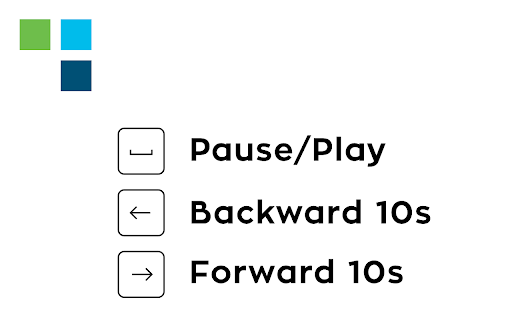
Use your keyboard inputs to pause/play your meeting recording, forward 10 seconds or backward 10 seconds using arrows.
什麼是WEBX Recordings Controls Automator?
WEBX Recordings Controls Automator是由https://www.andreacarpi.it開發的Chrome擴展程式,該擴展的主要功能是“Use your keyboard inputs to pause/play your meeting recording, forward 10 seconds or backward 10 seconds using arrows.”。
擴展截圖

下載WEBX Recordings Controls Automator擴展crx文件
下載WEBX Recordings Controls Automator擴展crx格式的文件,手動將Chrome擴充功能安裝到瀏覽器中,也可以將crx文件分享給朋友,輕鬆安裝Chrome擴充功能。
擴展使用說明
                        After the latest Webex Upgrade some extension features have been put in hold!

DISCLAIMER:

This extension allows you to use your keyboard inputs to pause/play your meeting recording, forward 10 seconds or backward 10 seconds using arrows. Use arrow up/arrow down to speed up/slow down the recording and press "f" to open the full-screen viewer. Press "c" to open/close the chat. Press "p" to open/close the participants panel.

Designed for Cisco Webex online recordings video player.

All trademarks belong to their respective owners
擴展基本資訊
| 名稱 |  WEBX Recordings Controls Automator WEBX Recordings Controls Automator |
| ID | lgkgpifjihgnoknjpnnldhhenefjpadi |
| 官方網址 | https://chromewebstore.google.com/detail/webx-recordings-controls/lgkgpifjihgnoknjpnnldhhenefjpadi |
| 簡介 | Use your keyboard inputs to pause/play your meeting recording, forward 10 seconds or backward 10 seconds using arrows. |
| 檔案大小 | 99.17 KB |
| 安裝次數 | 7,426 |
| 目前版本 | 5.0.1 |
| 更新時間 | 2022-06-05 |
| 上架時間 | 2021-03-08 |
| 評分 | 5.00/5 共 91 次評分 |
| 開發者 | https://www.andreacarpi.it |
| 電子郵箱 | [email protected] |
| 付費類型 | free |
| 擴展官網 | https://www.andreacarpi.it/webx-recordings-controls/ |
| 隱私政策頁面URL | https://www.andreacarpi.it/legal |
| 支援的語言 | it |
| manifest.json | |
{
    "update_url": "https:\/\/clients2.google.com\/service\/update2\/crx",
    "manifest_version": 2,
    "name": "WEBX Recordings Controls Automator",
    "description": "Use your keyboard inputs to pause\/play your meeting recording, forward 10 seconds or backward 10 seconds using arrows.",
    "version": "5.0.1",
    "content_scripts": [
        {
            "matches": [
                "*:\/\/*.webex.com\/*"
            ],
            "js": [
                "jquery.min.js",
                "jquery-ui.custom.min.js",
                "bililiteRange.js",
                "jquery.simulate.js",
                "jquery.simulate.ext.js",
                "jquery.simulate.drag-n-drop.js",
                "raphael-min.js",
                "content.js",
                "ui.js"
            ]
        }
    ],
    "default_locale": "it",
    "homepage_url": "https:\/\/www.andreacarpi.it\/",
    "browser_action": {
        "default_title": "__MSG_defaultTitle__",
        "default_icon": {
            "16": "assets\/images\/icon16.png",
            "24": "assets\/images\/icon24.png",
            "32": "assets\/images\/icon32.png",
            "48": "assets\/images\/icon48.png",
            "128": "assets\/images\/icon128.png"
        }
    },
    "icons": {
        "16": "assets\/images\/icon16.png",
        "24": "assets\/images\/icon24.png",
        "32": "assets\/images\/icon32.png",
        "48": "assets\/images\/icon48.png",
        "128": "assets\/images\/icon128.png"
    }
} | |