Stackoverflow Tag Search
Tag specific search on stackoverflow.com, right from the Chrome Onmibar!
什麼是Stackoverflow Tag Search?
Stackoverflow Tag Search是由Steve Reich開發的Chrome擴展程式,該擴展的主要功能是“Tag specific search on stackoverflow.com, right from the Chrome Onmibar!”。
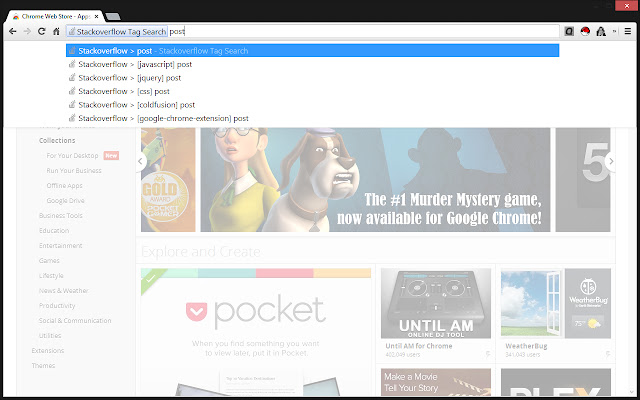
擴展截圖


下載Stackoverflow Tag Search擴展crx文件
下載Stackoverflow Tag Search擴展crx格式的文件,手動將Chrome擴充功能安裝到瀏覽器中,也可以將crx文件分享給朋友,輕鬆安裝Chrome擴充功能。
擴展使用說明
                        Type 's' and then hit the SPACE bar to be off and running with a tag specific search on stackoverflow.com. Forget sifting through Google's results, only to settle on a stack page anyway! And no more typing the language before the search terms either! Just set the search bar, type in your keywords, and then look at the awesome results!

Type 's' (without the quotes) + SPACE bar in the Google Onmibar to open the specialized search engine.

Right-click anywhere on any page to get to the options page to customize your tags!

FEATURES

- Right click on any page to get to the options screen to change your tags, sort, and save.
- Auto complete for tag verification with stackoverflow's 500 most popular tags!

If you use stackoverflow, this is the extension for you. It will get you to your search results in a single click! Check it out! If you like it, please rate it and let me know!
擴展基本資訊
| 名稱 |  Stackoverflow Tag Search Stackoverflow Tag Search |
| ID | lpdblnhhdcgiakcblccpdeggkganijol |
| 官方網址 | https://chrome.google.com/webstore/detail/stackoverflow-tag-search/lpdblnhhdcgiakcblccpdeggkganijol |
| 簡介 | Tag specific search on stackoverflow.com, right from the Chrome Onmibar! |
| 檔案大小 | 931 KB |
| 安裝次數 | 106 |
| 目前版本 | 1.0.1 |
| 更新時間 | 2013-11-03 |
| 上架時間 | 2013-11-03 |
| 評分 | 5.00/5 共 2 次評分 |
| 開發者 | Steve Reich |
| 付費類型 | free |
| 支援的語言 | en-US |
| manifest.json | |
{
"update_url": "https:\/\/clients2.google.com\/service\/update2\/crx",
"name": "Stackoverflow Tag Search",
"version": "1.0.1",
"manifest_version": 2,
"description": "Tag specific search on stackoverflow.com, right from the Chrome Onmibar!",
"icons": {
"16": "img\/stackoverflow_16.png",
"19": "img\/stackoverflow_19.png",
"24": "img\/stackoverflow_24.png",
"32": "img\/stackoverflow_32.png",
"48": "img\/stackoverflow_48.png",
"64": "img\/stackoverflow_64.png",
"96": "img\/stackoverflow_96.png",
"128": "img\/stackoverflow_128.png",
"256": "img\/stackoverflow_256.png"
},
"background": {
"scripts": [
"js\/background.js"
],
"persistent": false
},
"options_page": "options.html",
"permissions": [
"contextMenus",
"tabs",
" | |