Lightshot (screenshot tool)
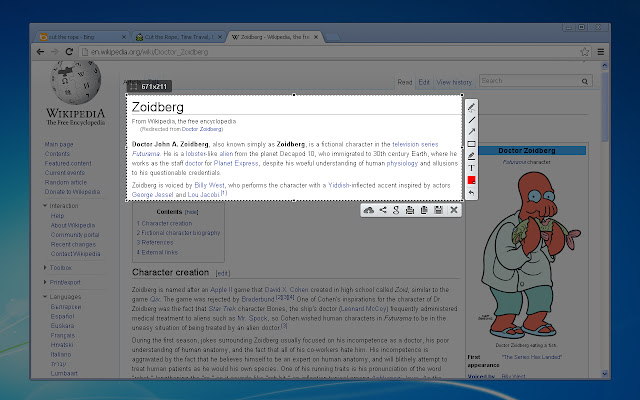
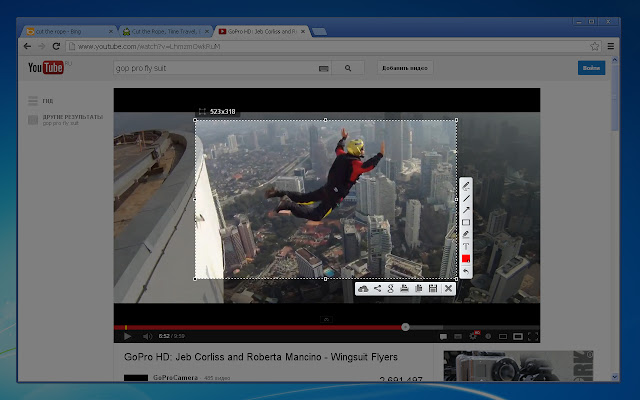
Simple and convenient screenshot tool. Select an area, edit your screenshot and upload it to the server.
什麼是Lightshot (screenshot tool)?
Lightshot (screenshot tool)是由https://app.prntscr.com開發的Chrome擴展程式,該擴展的主要功能是“Simple and convenient screenshot tool. Select an area, edit your screenshot and upload it to the server.”。
擴展截圖

下載Lightshot (screenshot tool)擴展crx文件
下載Lightshot (screenshot tool)擴展crx格式的文件,手動將Chrome擴充功能安裝到瀏覽器中,也可以將crx文件分享給朋友,輕鬆安裝Chrome擴充功能。
擴展使用說明
                        Lightshot is the fastest way to take a customizable screenshot. Simple interface, nothing useless and light weight.

Features:
* take screenshot and share it in few clicks
* select any part of the page
* edit screenshot in place
* save on a disk or upload to the cloud
* search for similar screenshots
* copy screenshot in clipboard

More information here: http://app.prntscr.com/
Privacy policy: https://app.prntscr.com/en/privacy.html?privacy

Clarification of the extension permissions:
* Read your browsing history - Chrome adds this line when we request tabs manipulation permission. Lightshot opens screenshot in a new tab, that is why we need it.
* Display notifications - Lightshot displays notification every time you upload screenshot
* Modify data you copy and paste - Lightshot allows you to copy screenshot into your Clipboard
* Manage your downloads - Lightshot allows you to save screenshot as a new file (works using download functions)

Contact e-mail: [email protected] Send your requests and bug reports here. We appreciate your contribution!
擴展基本資訊
| 名稱 |  Lightshot (screenshot tool) Lightshot (screenshot tool) |
| ID | mbniclmhobmnbdlbpiphghaielnnpgdp |
| 官方網址 | https://chrome.google.com/webstore/detail/mbniclmhobmnbdlbpiphghaielnnpgdp |
| 簡介 | Simple and convenient screenshot tool. Select an area, edit your screenshot and upload it to the server. |
| 檔案大小 | 669 KB |
| 安裝次數 | 3,248,647 |
| 目前版本 | 6.3.0 |
| 更新時間 | 2020-01-27 |
| 上架時間 | 2020-01-22 |
| 評分 | 4.41/5 共 6794 次評分 |
| 開發者 | https://app.prntscr.com |
| 電子郵箱 | [email protected] |
| 付費類型 | free |
| 擴展官網 | https://app.prntscr.com/ |
| 說明頁面URL | https://app.prntscr.com/help.html |
| 隱私政策頁面URL | https://app.prntscr.com/en/privacy.html?privacy |
| 支援的語言 | id,de,en,fr,nl,no,vi,tr,ca,da,et,es,hr,it,lv,lt,hu,pl,pt-BR,pt-PT,ro,sk,sl,fi,sv,cs,el,sr,bg,ru,uk,bn,th,zh-CN,zh-TW,ja,ko |
| manifest.json | |
{
"update_url": "https:\/\/clients2.google.com\/service\/update2\/crx",
"name": "__MSG_screenshotplugin_name__",
"default_locale": "en",
"icons": {
"24": "img\/icon24.png",
"38": "img\/icon38.png",
"19": "img\/icon19.png",
"32": "img\/icon32.png",
"128": "img\/icon128.png",
"256": "img\/icon256.png"
},
"author": "http:\/\/app.prntscr.com\/",
"background": {
"persistent": false,
"scripts": [
"libs\/jquery-3.2.1.min.js",
"event.js"
]
},
"version": "6.3.0",
"manifest_version": 2,
"permissions": [
" | |