Niagara Falls HD Wallpapers New Tabs Themes
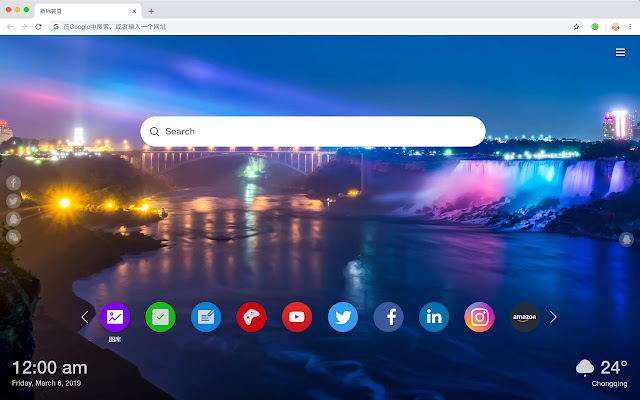
Each time you open a new tab, you will get different HD wallpapers from Niagara Falls. This new theme includes clock and more.
什麼是Niagara Falls HD Wallpapers New Tabs Themes?
Niagara Falls HD Wallpapers New Tabs Themes是由http://mytab.me開發的Chrome擴展程式,該擴展的主要功能是“Each time you open a new tab, you will get different HD wallpapers from Niagara Falls. This new theme includes clock and more.”。
擴展截圖


下載Niagara Falls HD Wallpapers New Tabs Themes擴展crx文件
下載Niagara Falls HD Wallpapers New Tabs Themes擴展crx格式的文件,手動將Chrome擴充功能安裝到瀏覽器中,也可以將crx文件分享給朋友,輕鬆安裝Chrome擴充功能。
擴展使用說明
                        Niagara Falls is located at the junction of Ontario, Canada and New York, USA. The source of the waterfall is the Niagara River. The main waterfall is located in Canada and is the best viewing place for the waterfall. In the United States, the waterfall is separated by the Moon Island. It is the side of the waterfall. At the same time, the waterfall is also the world's largest multinational waterfall.

Here is a list of the features we have designed for you to include this extension:
 - Open to search
 - To-do list
 - Set your favorite wallpapers
 - One-click access to popular websites
 - Game highlights
 - Social network notifications
 - High quality wallpaper for each new label
 - Clock showing date and time
 - Weather widget
 - Discover new hot spots
擴展基本資訊
| 名稱 |  Niagara Falls HD Wallpapers New Tabs Themes Niagara Falls HD Wallpapers New Tabs Themes |
| ID | mefeclkjbddfcobnpbhgipkegkeohodm |
| 官方網址 | https://chrome.google.com/webstore/detail/niagara-falls-hd-wallpape/mefeclkjbddfcobnpbhgipkegkeohodm |
| 簡介 | Each time you open a new tab, you will get different HD wallpapers from Niagara Falls. This new theme includes clock and more. |
| 檔案大小 | 34.78 KB |
| 安裝次數 | 55 |
| 目前版本 | 1.1.0.0 |
| 更新時間 | 2019-06-09 |
| 上架時間 | 2019-06-09 |
| 開發者 | http://mytab.me |
| 付費類型 | free |
| 支援的語言 | en,zh-CN,zh-TW |
| manifest.json | |
{
    "name": "__MSG_ext_name__",
    "manifest_version": 2,
    "description": "__MSG_ext_desc__",
    "browser_action": {
        "default_icon": {
            "48": "icons\/48.png"
        },
        "default_title": "__MSG_ext_name__"
    },
    "chrome_url_overrides": {
        "newtab": "pages\/newtab\/index.html"
    },
    "background": {
        "scripts": [
            "app.js",
            "pages\/background\/index.js"
        ],
        "persistent": false
    },
    "default_locale": "en",
    "icons": {
        "48": "icons\/48.png",
        "128": "icons\/128.png"
    },
    "minimum_chrome_version": "57",
    "offline_enabled": true,
    "update_url": "https:\/\/clients2.google.com\/service\/update2\/crx",
    "version": "1.1.0.0"
} | |