Waterloo AutoLog
Automatic login for Quest, WaterlooWorks, Learn, WatIAM, WatCard, myHRinfo and many other campus systems.
什麼是Waterloo AutoLog?
Waterloo AutoLog是由https://www.zijianshao.com開發的Chrome擴展程式,該擴展的主要功能是“Automatic login for Quest, WaterlooWorks, Learn, WatIAM, WatCard, myHRinfo and many other campus systems.”。
擴展截圖


下載Waterloo AutoLog擴展crx文件
下載Waterloo AutoLog擴展crx格式的文件,手動將Chrome擴充功能安裝到瀏覽器中,也可以將crx文件分享給朋友,輕鬆安裝Chrome擴充功能。
擴展使用說明
                        Enter your login information in options page, you will be automatically logged into supported campus login entrances of the University of Waterloo.

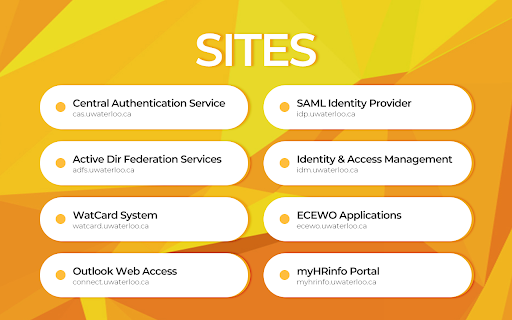
★ SUPPORTED SITES ★
- Central Authentication Service (cas.uwaterloo.ca)
- SAML Identity Provider (idp.uwaterloo.ca)
- Active Directory Federation Services (adfs.uwaterloo.ca)
- Identity & Access Management (idm.uwaterloo.ca)
- WatCard System (watcard.uwaterloo.ca)
- ECEWO Applications (ecewo.uwaterloo.ca)
- Outlook Web Access (connect.uwaterloo.ca)
- myHRinfo Portal (myhrinfo.hrms.uwaterloo.ca)

★ NOTES ★
- Don't use other auto login extensions together to avoid unexpected behaviors
- Pages may change at any time, thus the extension may not function properly
- If you have any questions regarding this extension, please email me at [email protected]

★ DISCLAIMERS ★
- This extension has no affiliation with the University of Waterloo
- Use this extension at your own responsibility
擴展基本資訊
| 名稱 |  Waterloo AutoLog Waterloo AutoLog |
| ID | ncpmlgiinkikhgijoplpnjggobinhkpl |
| 官方網址 | https://chromewebstore.google.com/detail/waterloo-autolog/ncpmlgiinkikhgijoplpnjggobinhkpl |
| 簡介 | Automatic login for Quest, WaterlooWorks, Learn, WatIAM, WatCard, myHRinfo and many other campus systems. |
| 檔案大小 | 106 KB |
| 安裝次數 | 552 |
| 目前版本 | 1.3.4 |
| 更新時間 | 2020-04-28 |
| 上架時間 | 2020-04-24 |
| 評分 | 5.00/5 共 3 次評分 |
| 開發者 | https://www.zijianshao.com |
| 電子郵箱 | [email protected] |
| 付費類型 | free |
| 擴展官網 | https://www.zijianshao.com/autolog/ |
| 支援的語言 | en |
| manifest.json | |
{
    "update_url": "https:\/\/clients2.google.com\/service\/update2\/crx",
    "manifest_version": 2,
    "name": "Waterloo AutoLog",
    "version": "1.3.4",
    "author": "Zijian Shao",
    "background": {
        "persistent": false,
        "scripts": [
            "js\/configs.js",
            "js\/background.js"
        ]
    },
    "browser_action": {
        "default_icon": {
            "16": "icon\/icon16.png",
            "24": "icon\/icon24.png",
            "32": "icon\/icon32.png"
        },
        "default_popup": "html\/popup.html",
        "default_title": "Waterloo AutoLog"
    },
    "content_scripts": [
        {
            "js": [
                "js\/jquery.js",
                "js\/configs.js",
                "js\/aes.js",
                "js\/hash.js",
                "js\/init.js"
            ],
            "matches": [
                "*:\/\/cas.uwaterloo.ca\/*",
                "*:\/\/idp.uwaterloo.ca\/*",
                "*:\/\/idm.uwaterloo.ca\/*",
                "*:\/\/ecewo.uwaterloo.ca\/*",
                "*:\/\/watcard.uwaterloo.ca\/*",
                "*:\/\/connect.uwaterloo.ca\/*",
                "*:\/\/adfs.uwaterloo.ca\/*",
                "*:\/\/myhrinfo.hrms.uwaterloo.ca\/*"
            ],
            "run_at": "document_start"
        }
    ],
    "description": "Automatic login for Quest, WaterlooWorks, Learn, WatIAM, WatCard, myHRinfo and many other campus systems.",
    "icons": {
        "128": "icon\/icon128.png",
        "16": "icon\/icon16.png",
        "48": "icon\/icon48.png"
    },
    "offline_enabled": false,
    "options_page": "html\/options.html",
    "permissions": [
        "activeTab",
        "storage",
        "*:\/\/cas.uwaterloo.ca\/*",
        "*:\/\/idp.uwaterloo.ca\/*",
        "*:\/\/idm.uwaterloo.ca\/*",
        "*:\/\/ecewo.uwaterloo.ca\/*",
        "*:\/\/watcard.uwaterloo.ca\/*",
        "*:\/\/connect.uwaterloo.ca\/*",
        "*:\/\/adfs.uwaterloo.ca\/*",
        "*:\/\/myhrinfo.hrms.uwaterloo.ca\/*"
    ],
    "short_name": "Waterloo AutoLog"
} | |