Wobbly Button
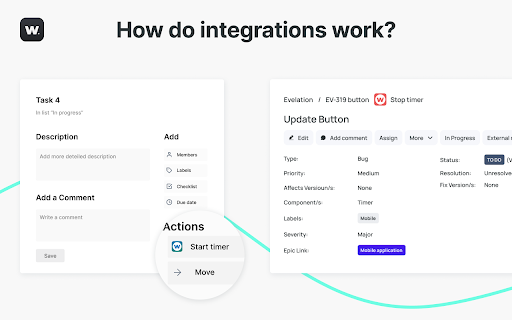
What Wobbly can do? Wobbly helps boost the productivity of your IT team and cut expenses! Main features of https://time.wobbly.me/:…
什麼是Wobbly Button?
Wobbly Button是由lazy-ants開發的Chrome擴展程式,該擴展的主要功能是“What Wobbly can do? Wobbly helps boost the productivity of your IT team and cut expenses! Main features of https://time.wobbly.me/:…”。
擴展截圖




下載Wobbly Button擴展crx文件
下載Wobbly Button擴展crx格式的文件,手動將Chrome擴充功能安裝到瀏覽器中,也可以將crx文件分享給朋友,輕鬆安裝Chrome擴充功能。
擴展使用說明
                        What Wobbly can do?
Wobbly helps boost the productivity of your IT team and cut expenses!
Main features of https://time.wobbly.me/:
◦ resources planning
◦ time tracking
◦ integration Jira & GitLab
◦ invoicing
◦ reporting


How do I set up the Wobbly button? (Guide with images – cсылка на новую документацию)
1. Click "Add to Chrome".
2. Log in to Wobbly from the extension menu or https://time.wobbly.me/timer  (tab can be closed)
3. Under settings give the extension permissions to inject itself into the services you desire
4. Tracking time by:
- clicking the integration button on supported web tools
- highlight the text on any tool/website, click the right mouse, and choose “Begin timer with the highlight description.” (work with any website/app)

The list of supported tools:
◦ Atlassian.com / Jira
◦ Atlassian.net / Jira
◦ Github
◦ Trello
◦ Gitlab
◦ Asana
◦ Redmine
◦ Basecamp
◦ Google Docs
◦ Salesforce Lightning
擴展基本資訊
| 名稱 |  Wobbly Button Wobbly Button |
| ID | nmnmeepomkgoejdjmgegdpaafhafjkkg |
| 官方網址 | https://chromewebstore.google.com/detail/wobbly-button/nmnmeepomkgoejdjmgegdpaafhafjkkg |
| 簡介 | What Wobbly can do? Wobbly helps boost the productivity of your IT team and cut expenses! Main features of https://time.wobbly.me/:… |
| 檔案大小 | 429 KB |
| 安裝次數 | 103 |
| 目前版本 | 1.2.5 |
| 更新時間 | 2023-12-02 |
| 上架時間 | 2020-05-05 |
| 評分 | 4.86/5 共 7 次評分 |
| 開發者 | lazy-ants |
| 電子郵箱 | [email protected] |
| 付費類型 | free |
| 擴展官網 | https://wobbly.me/ |
| 支援的語言 | en |
| manifest.json | |
{
    "update_url": "https:\/\/clients2.google.com\/service\/update2\/crx",
    "name": "Wobbly Button",
    "version": "1.2.5",
    "manifest_version": 2,
    "permissions": [
        "tabs",
        "notifications",
        "*:\/\/*.wobbly.me\/*",
        "storage",
        "contextMenus"
    ],
    "optional_permissions": [
        "*:\/\/*\/"
    ],
    "background": {
        "scripts": [
            "background.js"
        ]
    },
    "web_accessible_resources": [
        "images\/*.svg",
        "images\/*.png"
    ],
    "icons": {
        "16": "images\/favicon.png",
        "48": "images\/Wobbly_logo_48.png",
        "128": "images\/Wobbly_logo_128.png"
    },
    "browser_action": {
        "default_popup": "index.html"
    },
    "options_ui": {
        "page": "settings.html",
        "open_in_tab": true
    },
    "content_security_policy": "script-src 'self' 'sha256-GgRxrVOKNdB4LrRsVPDSbzvfdV4UqglmviH9GoBJ5jk='; object-src 'self'"
} | |