TabStats
TabStats is a basic chrome extension that tracks the number of open tabs in chrome.
什麼是TabStats?
TabStats是由Peetahzee開發的Chrome擴展程式,該擴展的主要功能是“TabStats is a basic chrome extension that tracks the number of open tabs in chrome.”。
擴展截圖
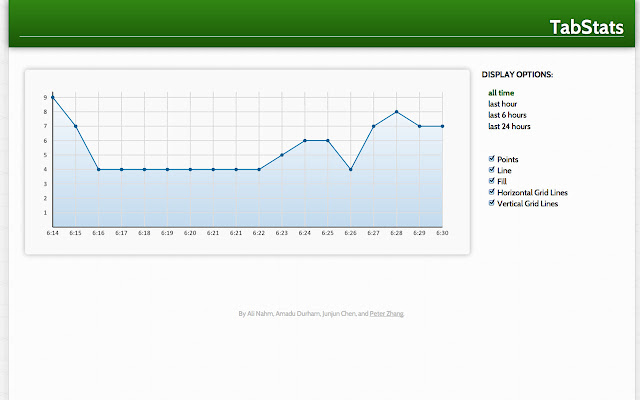

下載TabStats擴展crx文件
下載TabStats擴展crx格式的文件,手動將Chrome擴充功能安裝到瀏覽器中,也可以將crx文件分享給朋友,輕鬆安裝Chrome擴充功能。
擴展使用說明
                        TabStats is a basic chrome extension that tracks the number of open tabs in chrome. You can always open the chrome extension to see the number of tabs open.

You can also click the graph button and see a pretty graph of the history of your recent tab adventures. On this graph, you can adjust the display options so that you can see data points, filling, connecting lines, horizontal guidelines, and vertical guidelines. you can also change the timeframe of your tab adventures.

Future plans include...
- allowing users to change the color of various display features of the graph
- sharing your own chart via various social media sites (g+, fb, etc.)
- comparing your chart with friends with overlaying or other cool things
- making a more interactive graph with sliders, shiny buttons, etc.
- going to a new york city hackathon together
擴展基本資訊
| 名稱 |  TabStats TabStats |
| ID | ofefchjafojmiaffflndhpcnblbedbci |
| 官方網址 | https://chrome.google.com/webstore/detail/tabstats/ofefchjafojmiaffflndhpcnblbedbci |
| 簡介 | TabStats is a basic chrome extension that tracks the number of open tabs in chrome. |
| 檔案大小 | 311 KB |
| 安裝次數 | 208 |
| 目前版本 | 1.3 |
| 更新時間 | 2013-07-16 |
| 上架時間 | 2013-07-16 |
| 評分 | 5.00/5 共 5 次評分 |
| 開發者 | Peetahzee |
| 付費類型 | free |
| 支援的語言 | en |
| manifest.json | |
{
    "update_url": "https:\/\/clients2.google.com\/service\/update2\/crx",
    "name": "TabStats",
    "version": "1.3",
    "manifest_version": 2,
    "description": "TabStats is a basic chrome extension that tracks the number of open tabs in chrome.",
    "browser_action": {
        "default_icon": "views\/icon.png",
        "default_popup": "views\/popup.html"
    },
    "permissions": [
        "tabs",
        "history",
        "storage",
        "unlimitedStorage"
    ],
    "background": {
        "scripts": [
            "views\/jquery.js",
            "tracking\/utils.js",
            "tracking\/tabEvents.js"
        ]
    },
    "icons": {
        "16": "icon16.png",
        "48": "icon48.png",
        "128": "icon128.png"
    }
} | |