Translate into Urdu
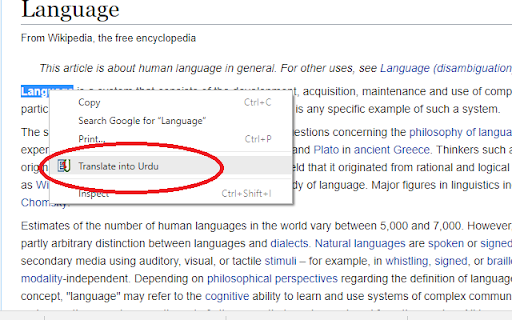
Simply select the word, right-click on it, int the Context Menu click "Translate into Urdu". A dialogue box displays the results.
什麼是Translate into Urdu?
Translate into Urdu是由Mustafa Hussain開發的Chrome擴展程式,該擴展的主要功能是“Simply select the word, right-click on it, int the Context Menu click "Translate into Urdu". A dialogue box displays the results.”。
擴展截圖
下載Translate into Urdu擴展crx文件
下載Translate into Urdu擴展crx格式的文件,手動將Chrome擴充功能安裝到瀏覽器中,也可以將crx文件分享給朋友,輕鬆安裝Chrome擴充功能。
擴展使用說明
                        nglish into Urdu Translate:
After installing, you can translate English words on a webpage into Urdu. Simply select the word, right-click on it, int the Context Menu click "Translate into Urdu". A dialogue box will display the results. You have to wait for Urdu meanings to load depending on your internet speed and Urdu meanings a word has. Results will display the meanings according to different parts of speech.
In a table against each meaning you can see the translation for almost all parts of speech for example noun, verb, adjective etc.
Good Practice:
Plural, complex words and sentences must be avoided.
Translation:
Make sure this add-on is for English into Urdu translation only. It means that the selected word must be an English word.
擴展基本資訊
| 名稱 |  Translate into Urdu Translate into Urdu |
| ID | ohohbfcpbhmbomjilbokachdnoanpbfn |
| 官方網址 | https://chromewebstore.google.com/detail/translate-into-urdu/ohohbfcpbhmbomjilbokachdnoanpbfn |
| 簡介 | Simply select the word, right-click on it, int the Context Menu click "Translate into Urdu". A dialogue box displays the results. |
| 檔案大小 | 83.33 KB |
| 安裝次數 | 824 |
| 目前版本 | 2.3 |
| 更新時間 | 2022-07-30 |
| 上架時間 | 2018-10-17 |
| 評分 | 1.00/5 共 1 次評分 |
| 開發者 | Mustafa Hussain |
| 電子郵箱 | [email protected] |
| 付費類型 | free |
| 支援的語言 | en |
| manifest.json | |
{
"update_url": "https:\/\/clients2.google.com\/service\/update2\/crx",
"description": "Simply select the word, right-click on it, int the Context Menu click \"Translate into Urdu\". A dialogue box displays the results.",
"manifest_version": 2,
"name": "Translate into Urdu",
"version": "2.3",
"background": {
"scripts": [
"js\/background.js"
]
},
"permissions": [
"contextMenus",
"storage",
" | |