Onion Browser Button
With only one click, you may instantly access the internet via a TOR proxy!
什麼是Onion Browser Button?
Onion Browser Button是由christianhilton64開發的Chrome擴展程式,該擴展的主要功能是“With only one click, you may instantly access the internet via a TOR proxy!”。
擴展截圖
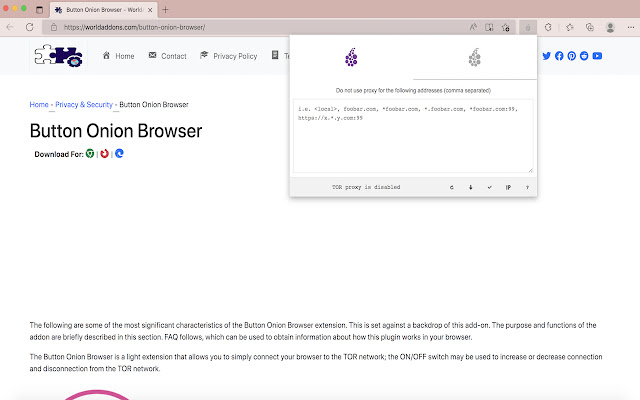
下載Onion Browser Button擴展crx文件
下載Onion Browser Button擴展crx格式的文件,手動將Chrome擴充功能安裝到瀏覽器中,也可以將crx文件分享給朋友,輕鬆安裝Chrome擴充功能。
擴展使用說明
                        The "Button Onion Browser" is an extension that allows you to connect to the TOR network in your browser with a few clicks (use as a proxy).

This is a crucial note: the software in this add-on has no ties to the Tor® project and has none with the Tor® anonymity software or website. It's essentially an unofficial extension made and kept by its developer independently.

Please make sure your computer (PC or MAC) is connected to the TOR network before using this addon. Please see the section below if you don't know how to connect your PC or MAC to the TOR network. A patch has been created that will assist people in connecting to the TOR network easily. The patch may be obtained by visiting this (https://github.com/jeremy-jr-benthum/onion-browser-button/releases) GitHub repository and downloading (mac.zip) or (win.zip) files.

Please follow the steps below to connect your computer to the TOR network after downloading the patch.

1. For PC users, download and unzip "win.zip" to your computer, while Mac users should download and unzip "mac.zip."

2. Please execute the "run.bat" file within the "win" folder on a Windows computer. Please run "run.sh" in the "win" folder on a Mac.

3. The first time you run the program, it will guide you through an easy-to-follow procedure. You will be asked to select a destination from 6 options. Please hit 1 on your keyboard to start the TOR connection on your computer, and when "Tor is connected successfully!" appears on the screen, you can utilize the Tor Browser Button add-on to join your browser to the TOR network. Please press 2 in order to terminate the connection. To generate a new TOR identity, pick 5; while restarting Tor connection, please choose 6.
擴展基本資訊
| 名稱 |  Onion Browser Button Onion Browser Button |
| ID | pbbhejokepfgcbcmdlegncgehfllgcmo |
| 官方網址 | https://chrome.google.com/webstore/detail/onion-browser-button/pbbhejokepfgcbcmdlegncgehfllgcmo |
| 簡介 | With only one click, you may instantly access the internet via a TOR proxy! |
| 檔案大小 | 168 KB |
| 安裝次數 | 606 |
| 目前版本 | 0.1 |
| 更新時間 | 2022-07-02 |
| 上架時間 | 2022-07-02 |
| 評分 | 4.83/5 共 23 次評分 |
| 開發者 | christianhilton64 |
| 電子郵箱 | [email protected] |
| 付費類型 | free |
| 擴展官網 | https://worldaddons.com/button-onion-browser/ |
| 說明頁面URL | https://worldaddons.com/contact/ |
| 支援的語言 | en |
| manifest.json | |
{
    "update_url": "https:\/\/clients2.google.com\/service\/update2\/crx",
    "version": "0.1",
    "manifest_version": 3,
    "short_name": "button-onion-browser",
    "name": "Onion Browser Button",
    "permissions": [
        "proxy",
        "storage",
        "notifications"
    ],
    "host_permissions": [
        "https:\/\/check.torproject.org\/*"
    ],
    "homepage_url": "https:\/\/worldaddons.com\/button-onion-browser\/",
    "description": "With only one click, you may instantly access the internet via a TOR proxy!",
    "commands": {
        "_execute_action": []
    },
    "background": {
        "service_worker": "background.js"
    },
    "action": {
        "default_title": "Onion Browser Button",
        "default_popup": "source\/popup\/popup.html",
        "default_icon": {
            "16": "source\/icons\/16.png",
            "32": "source\/icons\/32.png",
            "48": "source\/icons\/48.png",
            "64": "source\/icons\/64.png"
        }
    },
    "icons": {
        "16": "source\/icons\/16.png",
        "32": "source\/icons\/32.png",
        "48": "source\/icons\/48.png",
        "64": "source\/icons\/64.png",
        "128": "source\/icons\/128.png"
    }
} | |