Virtual Keyboard
Fullscreen on-screen virtual keyboard for touch screen devices
什麼是Virtual Keyboard?
Virtual Keyboard是由https://xontab.com開發的Chrome擴展程式,該擴展的主要功能是“Fullscreen on-screen virtual keyboard for touch screen devices”。
擴展截圖


下載Virtual Keyboard擴展crx文件
下載Virtual Keyboard擴展crx格式的文件,手動將Chrome擴充功能安裝到瀏覽器中,也可以將crx文件分享給朋友,輕鬆安裝Chrome擴充功能。
擴展使用說明
                        Suggest a Feature:
https://apps.xontab.com/Suggest/VirtualKeyboard/

Extension Details Page:
http://apps.xontab.com/VirtualKeyboard/

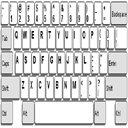
Virtual Keyboard will popup automatically when the user clicks on an input field such as textboxes and textareas.  Futhermore, the keyboard will disappear automatically when no longer needed.

This extension is ideal for touch screen devices.  This keyboard works like an iOS/Android/Windows 8 touch virtual keyboard.

Version History:
1.12 - Optimisations and minor fixes
1.11.1 - Added Swedish keyboard layout
1.10.9 - MAXLENGTH HTML5 forms feature is now supported
1.10.5 - Added Norwegian keyboard layout
1.10.3 - Added Hungarian keyboard layout
1.10.0 - Added Korean and German keyboard layouts
1.9.15 - Added Tamil 99 keyboard layout
1.9.13 - Added Polish and Spanish keyboard layouts
1.9.10 - Added Slovenian keyboard layout
1.9.6 - Minor fixes, Added "Auto Clicking via Mouse Hover" feature
1.9.0 - Added Hardware acceleration BETA (for faster animations)
        This option needs to be enabled from the options page
        Added Zoom level
1.8.8 - Bug fix (thanks to Alex)
1.8.3 - Improved touch events support.
1.8.0 - Bug fixes and Improvements thanks to Stuart Wright.  Improved enter button, memory usage, keyboard events triggering, small keyboard enhancements and much much more.
1.7.2 - Added a smaller keyboard
1.7.1 - Added AZERTY keyboard layout (Beta)
1.7 - Added basic iframe support
(Note: Cross-domain and wysiwyg are not supported due to security restrictions in Google Chrome)
1.6.1 - Added on-demand mode
1.6 - Added toggle button
1.5.13 - Added underscore button
1.5.4 - Added support to Touch events
1.5.3 - Bug fixes; Migrated to manifest version 2
1.5.0 - Added Russian Keyboard Layout
1.4.7 - Added URL Bar (needs to be enabled from options page)
1.4.6 - Improved UI for various screen sizes
1.4.5 - Fixed Return key in Textareas.  Added some features requested on Suggestion page
1.4 - Added number row, Added support to email and number fields
1.0 - Initial Version

Visit http://xontab.com/Apps for more FREE Chrome Extensions
擴展基本資訊
| 名稱 |  Virtual Keyboard Virtual Keyboard |
| ID | pflmllfnnabikmfkkaddkoolinlfninn |
| 官方網址 | https://chromewebstore.google.com/detail/virtual-keyboard/pflmllfnnabikmfkkaddkoolinlfninn |
| 簡介 | Fullscreen on-screen virtual keyboard for touch screen devices |
| 檔案大小 | 60.91 KB |
| 安裝次數 | 219,415 |
| 目前版本 | 1.12.8 |
| 更新時間 | 2023-12-29 |
| 上架時間 | 2017-10-23 |
| 評分 | 3.12/5 共 758 次評分 |
| 開發者 | https://xontab.com |
| 電子郵箱 | [email protected] |
| 付費類型 | free |
| 擴展官網 | http://xontab.com/ |
| 說明頁面URL | http://xontab.com/apps/VirtualKeyboard/ |
| 隱私政策頁面URL | https://apps.xontab.com/VirtualKeyboard/PrivacyPolicy |
| 支援的語言 | en |
| manifest.json | |
{
"update_url": "https:\/\/clients2.google.com\/service\/update2\/crx",
"name": "Virtual Keyboard",
"description": "Fullscreen on-screen virtual keyboard for touch screen devices",
"manifest_version": 2,
"version": "1.12.8",
"icons": {
"16": "keyboard.png",
"48": "keyboard.png",
"128": "keyboard.png"
},
"background": {
"scripts": [
"background.js"
]
},
"options_page": "options.html",
"page_action": {
"default_icon": "buttons\/keyboard_2.png",
"default_title": "Virtual Keyboard Toggle",
"default_popup": "toggle.html"
},
"permissions": [
"tabs",
" | |