Smart New Tab
A smarter new tab page for everyone
什麼是Smart New Tab?
Smart New Tab是由https://bewisse.com開發的Chrome擴展程式,該擴展的主要功能是“A smarter new tab page for everyone”。
擴展截圖


下載Smart New Tab擴展crx文件
下載Smart New Tab擴展crx格式的文件,手動將Chrome擴充功能安裝到瀏覽器中,也可以將crx文件分享給朋友,輕鬆安裝Chrome擴充功能。
擴展使用說明
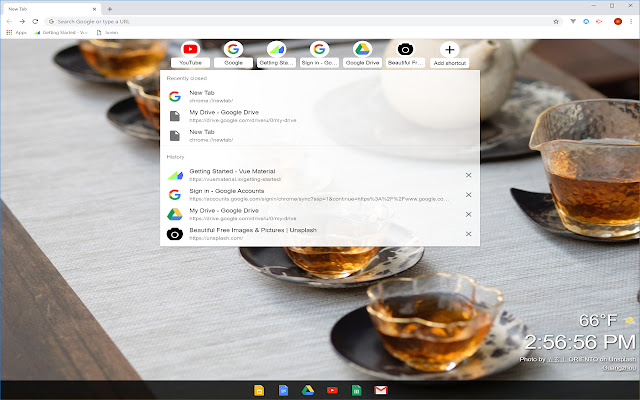
                        Smart New Tab gives you quick access to what you need in your New Tab screen.

** Features **
- Top visited sites
- Search with clipboard text
- Recent searches on Google
- Recently closed tabs across all devices
- Recent browse history
- Apps
- Weather
- Automatically update background picture
- Add more shortcut

** Version 1.1.2 **
- Improve the initial experience

** Version 1.1.1 **
- Hide empty app bar and make list collapsible

** Version 1.1.0 **
- Make most permissions optional. User can selectively decide which permission to grant in the extension.

Official website:
https://bewisse.com/newtab/

Source code:
https://github.com/bewisse/newtab
擴展基本資訊
| 名稱 |  Smart New Tab Smart New Tab |
| ID | ppbaflbhifnaoimjkaogodphnbhdgmfi |
| 官方網址 | https://chrome.google.com/webstore/detail/smart-new-tab/ppbaflbhifnaoimjkaogodphnbhdgmfi |
| 簡介 | A smarter new tab page for everyone |
| 檔案大小 | 508 KB |
| 安裝次數 | 128 |
| 目前版本 | 1.1.3 |
| 更新時間 | 2021-06-29 |
| 上架時間 | 2020-04-26 |
| 評分 | 5.00/5 共 1 次評分 |
| 開發者 | https://bewisse.com |
| 電子郵箱 | [email protected] |
| 付費類型 | free |
| 擴展官網 | https://bewisse.com/newtab/ |
| 說明頁面URL | https://bewisse.com/newtab/ |
| 隱私政策頁面URL | https://modheader.com/privacy |
| 支援的語言 | en |
| manifest.json | |
{
    "update_url": "https:\/\/clients2.google.com\/service\/update2\/crx",
    "name": "Smart New Tab",
    "version": "1.1.3",
    "description": "A smarter new tab page for everyone",
    "author": "[email protected]",
    "manifest_version": 2,
    "icons": {
        "16": "icons\/16.png",
        "24": "icons\/24.png",
        "32": "icons\/32.png",
        "48": "icons\/48.png",
        "64": "icons\/64.png",
        "128": "icons\/128.png"
    },
    "background": {
        "scripts": [
            "background.js"
        ]
    },
    "browser_action": {
        "default_icon": {
            "16": "icons\/16.png",
            "24": "icons\/24.png",
            "48": "icons\/48.png",
            "64": "icons\/64.png",
            "128": "icons\/128.png"
        },
        "default_popup": "popup\/popup.html"
    },
    "permissions": [
        "chrome:\/\/favicon\/",
        "https:\/\/www.google.com\/*",
        "storage"
    ],
    "optional_permissions": [
        "tabs",
        "clipboardRead",
        "topSites",
        "history",
        "management",
        "sessions"
    ],
    "chrome_url_overrides": {
        "newtab": "pages\/newtab.html"
    },
    "content_security_policy": "script-src 'self' 'unsafe-eval'; object-src 'self'"
} | |
![Smartnews For PC Window 10 [Guide]](https://lh3.googleusercontent.com/YQ91vXfEvhGPGKX6bIzmpYKKPrc2SCSxtvGX2ypj9XfgF2x77TKfE_Ib8g95lpo3bbfq32J-XA=w128-h128-e365-rj-sc0x00ffffff)